Designing a Professional Sound System for an Auditorium: A Comprehensive Guide
The success or failure of a conference is often determined by a factor that few pay attention to until it becomes a problem: sound quality . Speakers experiencing echoes, microphones producing annoying screeching sounds, speakers misplaced causing half the audience to be unable to hear clearly—these are all problems that can be completely prevented by designing a proper conference sound system from the outset.
This article provides comprehensive technical guidance for designing and installing professional sound systems for auditoriums with seating capacities ranging from 50 to 500 people.
1. Understanding Acoustics — A Foundation Before Choosing Equipment
Before purchasing any equipment, it's necessary to analyze the acoustic characteristics of the space. A 500 million VND audio system placed in a room with poor acoustics will perform worse than a 100 million VND system in a properly treated room.
Common Acoustic Problems
Reverberation Time (RT60):
- RT60 is the time it takes for the sound level to drop by 60 dB after the sound source is turned off.
- Lecture/conference hall: The ideal RT60 is 0.6–1.0 seconds .
- RT60 is too high (concrete, glass, brick room): Echoes, difficulty hearing individual words clearly.
- RT60 is too low (room with lots of fabric, thick carpet): The sound is "dead," lacking naturalness.
Echoes and reflections:
- Parallel walls reflect sound back and forth, creating a flutter echo.
- The low, flat ceiling reflects light down onto the audience's heads, causing interference.
Acoustic Treatment Methods
- Sound-absorbing materials: Fabric-covered acoustic panels, carpets, thick curtains — placed in areas of strong reflection (back of the hall, side walls).
- Sound-diffusing materials (diffusers): Their rough, uneven surface creates multi-directional reflection, preventing echoes without completely absorbing sound.
- Ceiling design: Sloping or angled ceilings direct sound reflections toward the audience instead of bouncing back.
2. Speaker Systems — Choosing the Type and Placement
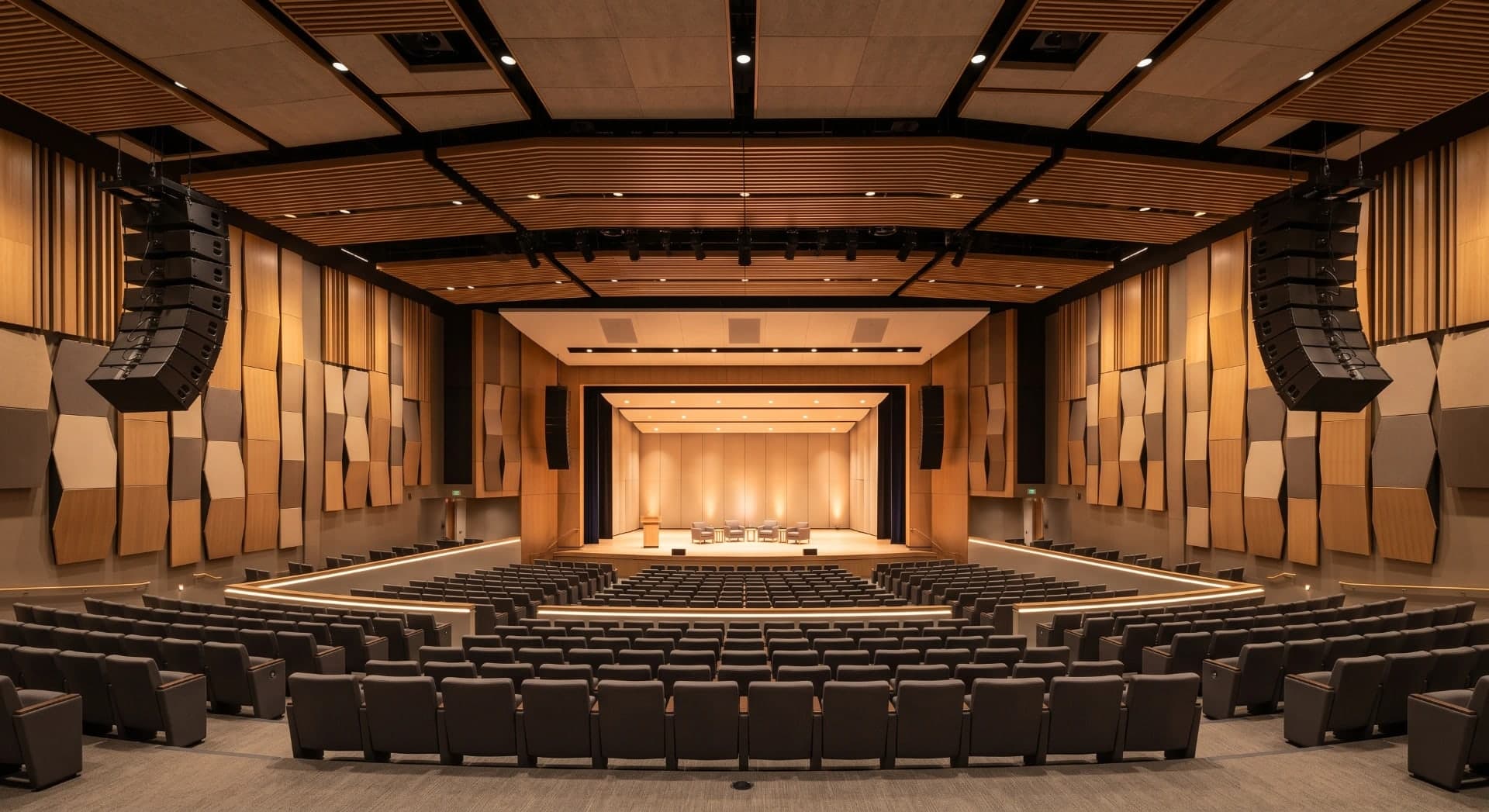
2.1 Line Array — A Solution for Large Auditoriums (200+ Seats)
A line array is a system consisting of multiple vertically arranged speaker modules that function as an acoustic antenna array.
Advantage:
- Vertical sound control is highly precise — the sound "embraces" the audience, with no sound wasted on the ceiling or floor.
- It provides much wider and more even coverage compared to conventional speakers.
- Suitable for halls with a large depth (> 20 m).
Arrangement: Hang two line arrays on either side of the stage, adjusting the display angle so that the sound is evenly distributed from the front to the back row.
Subwoofer: Place it below the stage or beneath the line array to evenly distribute bass throughout the hall.
2.2 Column Speakers — Common for Medium-Sized Auditoriums (100–300 Seats)
Column speakers have a structure of small-diameter speakers arranged vertically, creating a narrow sound beam horizontally but a wide one vertically.
- Even coverage across a wide horizontal range (90–120°).
- High frequencies are controlled, reducing ceiling echo.
- Simple and neat installation, aesthetically pleasing for modern auditoriums.
- Example placement: 2 column speakers on either side of the stage, or distributed along the two side walls with delay.
2.3 Ceiling Speakers — BGM and Small Halls (< 100 Seats)
Ceiling speakers are commonly used for:
- Background music (BGM) in the lobby, hallways, and waiting areas.
- Small meeting rooms, training rooms with low ceilings (< 4 m).
- Building-wide Public Address (PA) system.
Note: Ceiling speakers are not suitable as the primary sound source for large auditoriums because they do not focus the sound and create a lot of reflections.
2.4 Delay Speaker
For long halls (depth > 25 m) or those with balconies, additional delay speakers should be added at the rear/balconies. Electronic delay processing ensures that the sound from the delay speakers reaches the audience at the right time, without double echo with the sound from the main speakers.

3. Power Amplifiers — Calculating the Correct Power Output
Power Calculation Rules
Many installers choose an amplifier that's "just right"—this is a common mistake. What's actually needed:
- Amplifier power should be 2–2.5 times the speaker's rated power. A 200W RMS speaker requires a 400–500W amplifier.
- Why? Music and speech have peaks that are 6–10 dB higher than average. An amplifier lacking sufficient power will clipping at these peaks, causing hissing and potentially damaging the speakers.
- 20% reserve: Do not run the amplifier at 100% power continuously.
Class D vs Class AB Amplifiers
- Class AB: Traditional sound signature, good thermal stability. Suitable for applications requiring the highest sound quality.
- Class D: High efficiency (>90%), compact, low heat generation. Suitable for multi-channel rack installations.
Digital Amplifier with Integrated DSP
Modern trend: Amplifiers with built-in DSP (Digital Signal Processor) allow for:
- Set crossover, EQ, limiter, and delay directly for each channel.
- Reduce the number of devices in the rack and simplify system configuration.
- Remote control via LAN.

4. Mixing Console — Audio Control Center
Analog Mixer
- Intuitive operation using a physical fader.
- Less susceptible to software errors.
- Suitable for non-specialized operational personnel.
Digital Mixer
- Save scenes/presets for each different event — with a single button press, you return to the exact settings of the conference session.
- Instant recall when program changes occur.
- High-precision EQ, compressor, and gate processing on each channel.
- Remote control via iPad/tablet — technicians can adjust the sound from the middle of the hall without having to stand at the mixer console.
- Recommendation: Use a digital mixer for auditoriums with 200 seats or more, or any venue hosting a variety of events.
5. Wireless Microphones — Selection and Usage
UHF vs 2.4 GHz Wireless Microphone System
- UHF (470–698 MHz): Professional standard, stable, less susceptible to interference from WiFi and Bluetooth. Long operating range (> 50 m).
- 2.4 GHz: Cheaper, but in the same frequency band as WiFi — prone to interference in a hall with many WiFi devices.
Recommendation: Always use a UHF system for professional auditoriums.
Types of Microphones by Application
- Handheld microphone: For mobile speakers and singers. Wide pickup range, capable of handling close-up shots of the mouth.
- Lavalier/lapel microphone: For speakers needing free-standing microphones, panel discussions. Compact and discreet recording.
- Headset microphone: Ideal for speakers who move around a lot, MCs, and tour guides. Maintains a fixed microphone distance and ensures consistent signal.
- Microphone gooseneck: Fixed to the podium or boardroom.
- Micro boundary (PZM): Placed on the conference table, it captures sound omnidirectionally.
Multi-Channel Frequency Management
When using multiple wireless microphone sets simultaneously (> 4 sets), you need:
- Use frequency management software to allocate channels that are free from intermodulation.
- Minimum frequency spacing of 600 kHz between channels (varies by brand).
- Some brands (Shure, Sennheiser) offer automatic frequency calculation tools.

6. DSP Processor — The "Brain" of the System
A DSP (Digital Signal Processor) is a device that processes digital audio signals, performing functions that previously required multiple separate analog devices:
- Parametric EQ: Detailed frequency balancing for each zone, compensating for the acoustic characteristics of the room.
- Crossover: Divides the frequency range for the treble, mid, bass, and subwoofer speakers.
- Delay: Synchronizes audio timing between the main speaker and the delay speaker.
- Compressor/Limiter: Protects speakers from overload and maintains a consistent volume level.
- Acoustic Echo Cancellation (AEC): Eliminates echoes in video conferencing — mandatory when integrating with online meeting systems (Zoom, Teams).
- Noise Gate: Automatically mutes the microphone when there is no voice, eliminating background noise.
- Automatic Gain Control (AGC): Automatically adjusts the gain to ensure the voice remains at a consistent volume level.
7. PA and BGM Systems — Parallel Design
PA (Public Address) System
- Purpose: To issue emergency announcements and manage events.
- Coverage: The entire area, including hallways, restrooms, and outdoor patios.
- Requirement: Prioritize the PA signal and automatically cut off the BGM signal.
- In high-rise buildings: Integrated with fire alarm systems and floor-by-floor evacuation guidance.
BGM (Background Music) System
- Background music for lobbies, hallways, and dining areas.
- Separate from the main hall sound system to operate independently.
- Zone control for volume control.
- Source: Online streaming, USB, or integrated media player.
8. Video Conferencing Integration
An indispensable trend after the pandemic: combining physical auditoriums with online conferencing.
Components to be integrated:
- PTZ (Pan-Tilt-Zoom) Camera: Automatically track the speaker or control presets.
- Conference codec: A device that processes video/audio and sends it to the platform (Cisco, Poly, Logitech Rally).
- AEC in DSP: Eliminates room echo before sending audio to the conference.
- Dante/AES67 audio networking: Connect audio devices via LAN, offering flexibility and eliminating complex wireless connectivity.
- Integrated display screen: Online participants can see the event on a large screen.
9. Budget by Hall Size
Scale
Seating
Basic configuration
Estimated budget
Small
50–100
2 column speakers + 1 amplifier + mixer + 2 microphones
30–80 million
Fit
100–200
Small line array + DSP + digital mixer + 4 microphones
100–250 million
Big
200–500
Line array + sub + DSP + digital mixer + 8+ microphones + video conf
300–800 million
Note: Costs vary significantly depending on the brand and specific project requirements.
Quang Duc — Specialist in Designing and Installing Auditorium Sound Systems
Quang Duc (Quang Duc Electronics and Telecommunications Co., Ltd.) provides professional auditorium sound system design and installation services. From internal meeting rooms for 20 people to event halls with 500+ seats, Quang Duc's technical team conducts on-site acoustic surveys, advises on solutions that fit your budget, and ensures professional-standard sound quality.
Quang Duc integrates the entire ecosystem: audio + video + online conferencing — a single partner for all your corporate meeting room needs.
Conclude
Designing a proper auditorium sound system requires a combination of understanding the acoustics of the space, selecting appropriate equipment, and practical installation experience. There is no fixed formula — each auditorium has unique characteristics requiring a personalized solution.
Contact Quang Duc today for a free acoustic survey and receive a detailed sound system design tailored to your space and budget.
- Website: cameraquangduc.vn