
Cloud PBX Virtual Call Center: A Trend for Small and Medium-Sized Businesses
The initial investment cost for a traditional IP-PBX system—including servers, licensed software, and gateway equipment—can reach 30–80 million VND for a business with 20–50 employees, not including maintenance and IT personnel costs. In contrast, a Cloud PBX allows businesses to have a professional telephone system immediately with just a monthly subscription fee, without needing to invest in hardware.
The trend of shifting from on-premise call centers to Cloud PBX is rapidly increasing in Vietnam's small and medium-sized enterprises (SMEs), especially after remote work became a constant necessity. This article analyzes in detail the differences, features, and practical benefits of this solution.
Comparing On-Premise IP-PBX and Cloud PBX
Criteria
On-Premise IP-PBX
Cloud PBX
Initial investment cost
High (server, license, gateway)
Almost zero, just terminal configuration.
Operating costs
Electrical, server maintenance, internal IT
Fixed monthly subscription fee
Implementation time
1–2 weeks (installation, configuration)
A few hours to 1 day
Scalability
Limitations based on the purchased server configuration.
Add/remove extensions flexibly via the portal.
Working remotely
Requires VPN or complex configuration.
Softphone for instant internet access anywhere.
Risks associated with power outages/hardware failures in the office.
The entire system has stopped working.
It's still operational because the server is located in a data center.
Maintenance and updates
Businesses are solely responsible.
The service provider automatically updates.
Suitable for scale
Large businesses with their own IT teams.
Small and medium-sized enterprises, dispersed branches
Operating Mechanism: SIP Trunk and Softphone
What is SIP Trunk?
SIP trunks are virtual connections between a PBX system and the public telephone network (PSTN) via the Session Initiation Protocol (SIP) over the Internet, completely replacing traditional analog telephone lines. With Cloud PBX, the service provider manages the entire SIP trunk, and businesses only need to connect their end devices.

Softphone Extensions
Instead of equipping each employee with a physical IP desk phone, Cloud PBX supports softphones —applications installed on computers or mobile phones that allow making and receiving calls via the company's central switchboard number.
- Employees can receive customer calls directly on their personal phones without revealing their private numbers.
- Working remotely or traveling for business, you can still maintain contact through the main switchboard number.
- Call transfer, hold, and conference functions operate like a physical desk phone.
- There's no need to invest in IP desk phones for all employees, resulting in significant equipment cost savings.
IVR and Integrated Call Center Features
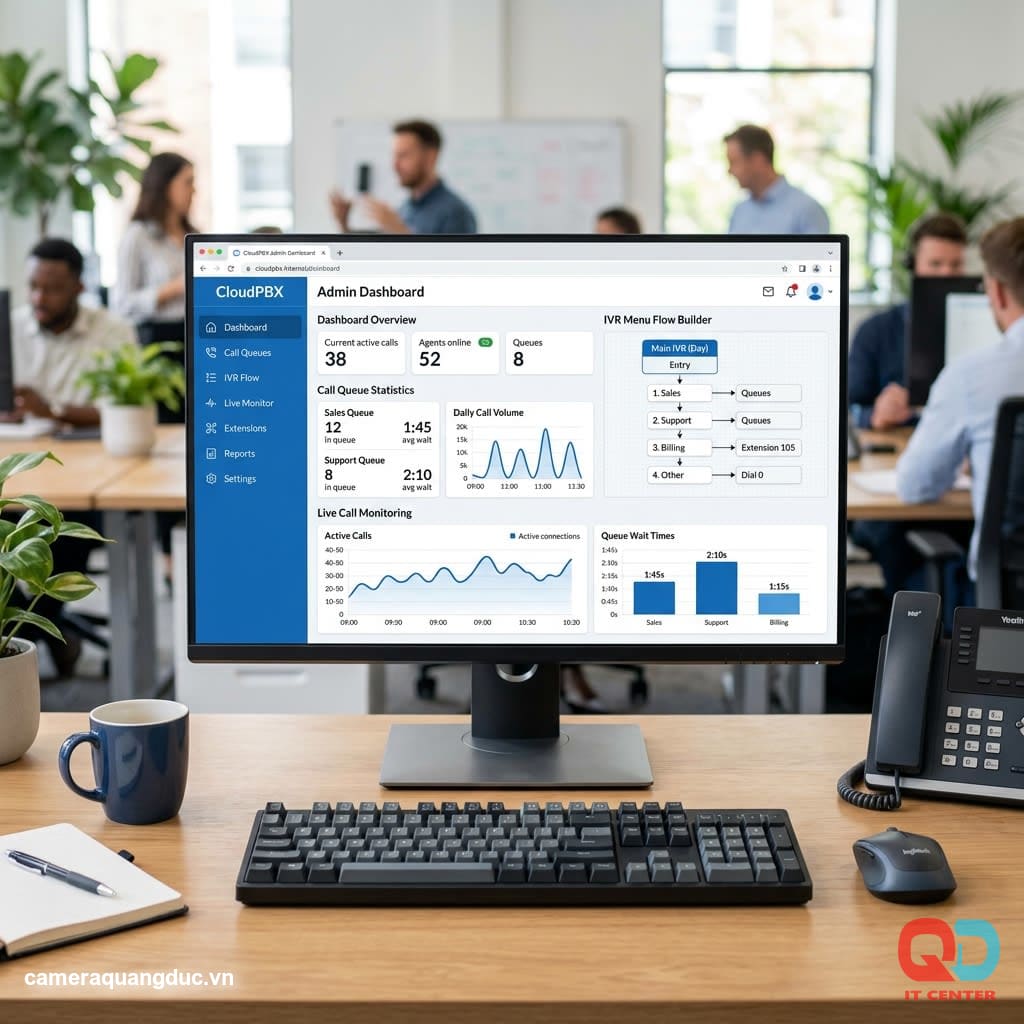
IVR (Interactive Voice Response) is a core feature that helps small and medium-sized businesses make a professional impression from the very first call.
- An automated greeting guides customers to select a department by pressing a key (1. Sales, 2. Technical, 3. Customer Service...).
- Automatically route calls to the correct team of responsible employees.
- Call queue with hold music and location announcements when all staff are busy.
Additional call center features for SMEs:
- Call statistics report: number of missed calls, average wait time, answer rate.
- Real-time call monitoring for sales/customer service team managers.
- Allocate calls fairly (round-robin) or according to priority levels among employees.
- Integrate your CRM to automatically display customer information when a call comes in.
Cloud Call Recording
Call recording is a mandatory requirement in many industries (finance, insurance, sales) for training and dispute resolution purposes.
- Automatically record all incoming and outgoing calls, storing them in the cloud without consuming internal hard drive space.
- Search for audio files by phone number, extension, and date/time through the administration interface.
- Authorization for listening to audio recordings is based on management level, ensuring the confidentiality of customer information.
- Flexible storage duration depending on the service package (3 months, 6 months, 1 year, or unlimited)
Monthly Subscription Costs: An Economic Equation for SMEs
Cloud PBX costs are typically calculated using the following model:
- The subscription fee is fixed per month based on the number of extensions (e.g., 10 extensions, 20 extensions).
- Call charges are based on actual minutes of outgoing calls (in-network, inter-network, and international calls) or on a fixed-price package.
- Additional features (call center, CRM integration, extended recording) are charged differently by the provider.
Comparison of 3-year costs for a business with 20 employees (illustration):
Category
On-Premise IP-PBX
Cloud PBX
Initial investment
~50,000,000 VND
~3,000,000 VND (terminal equipment)
Operating costs/year
~15,000,000 VND (maintenance, electricity, license)
~24,000,000 VND (for a subscription with 20 extensions)
Total cost over 3 years
~95,000,000 VND
~75,000,000 VND
For smaller-scale projects and shorter-term use (under 5 years), Cloud PBXs always offer a cash flow advantage — requiring no large initial investment.
Security: SRTP and TLS
Many businesses worry that cloud-based PBX systems are less secure than on-premise systems — in reality, reputable Cloud PBX providers employ strict encryption standards:
- TLS (Transport Layer Security): Encrypts all signaling between the endpoint device and the server, preventing eavesdropping on call routing information.
- SRTP (Secure Real-time Transport Protocol): Encrypts call audio in real time, ensuring that no one can intercept or listen to the conversation.
- Two-factor authentication (2FA) is enabled for portal administrator accounts, restricting unauthorized access and configuration changes.
- A reputable provider with international security certification (ISO 27001) for data center infrastructure.

Checklist for selecting a Cloud PBX provider.
- We guarantee a minimum SLA uptime of 99.9%.
- Supports SRTP/TLS encryption for all calls.
- There are stable softphone applications available on iOS, Android, Windows, and macOS.
- Vietnamese-language administration portal, easy to use for adding/removing extensions.
- The technical support team responds quickly and has clear SLAs for troubleshooting.
- The data privacy and recording policy is clear and complies with domestic regulations.
Cases Where and When Should You Switch to Cloud PBX?
Not every business is suited for immediate transformation. Here's a practical perspective to consider:
You should switch to Cloud PBX when:
- Businesses with multiple branches, employees who work remotely, or those who frequently travel.
- Having never invested in a call center system before, I want to deploy it quickly and at a low cost.
- A stable internet connection with sufficient bandwidth is required (a minimum of 100kbps per simultaneous call is recommended).
- The number of extensions needs to be expanded or reduced flexibly according to business seasons.
Consider these points before making a move:
- Businesses in areas with unstable internet infrastructure frequently experience connection loss.
- We have invested in a new, not yet fully depreciated, on-premise IP-PBX system.
- Specific requirements regarding internal data compliance (data must be stored on-site, not through a third party).
The Process of Migrating from a Legacy PBX to a Cloud PBX
- Survey the organizational structure, number of extensions, and current call flow.
- Register a new phone number or transfer your old number (number porting) to a Cloud PBX provider.
- Configure IVR, group calls by department according to organizational structure.
- Install softphones and train staff to use them alongside the old system for 1-2 weeks.
- Officially transitioning completely, discontinuing the old system after stability is confirmed.
Checklist for Evaluating Internet Connection Quality Before Deployment
- Measure actual internet upload/download speeds during peak hours, not just the speeds advertised by your internet provider.
- Check the latency and packet loss rate on the current transmission line.
- Ensure your router/firewall supports QoS prioritization for voice traffic.
- Confirm that your Internet service provider is not blocking SIP ports (typically UDP port 5060 and the RTP band).
- There is a backup connection option (4G/5G backup) in case the main internet connection fails.
Quang Duc's Virtual Call Center Deployment Service
Quang Duc Electronics and Telecommunications Co., Ltd. provides consulting and implementation services for Cloud PBX virtual call centers for small and medium-sized enterprises:
- We advise on selecting the service package that best suits your business scale, budget, and industry.
- Configure IVR, call routing, and call queues according to the company's organizational structure.
- Install and provide instructions on using softphones on mobile devices and computers for all employees.
- Integrating SIP trunk ensures stable call quality over existing internet infrastructure.
- Continuous technical support after deployment, prompt troubleshooting.
Conclude
Cloud PBX systems are no longer a futuristic trend but have become a practical and cost-effective option for small and medium-sized enterprises (SMEs) in Vietnam. With rapid deployment, predictable costs, and a full range of professional features comparable to traditional PBX systems, this is a logical step for businesses looking to professionalize their communication systems without investing in complex infrastructure.
Contact Quang Duc today for advice on the right virtual call center solution for your business.
Hotline: 0903 306 126 (Mr.Vũ Trần) | Website: cameraquangduc.vn