
PC & Workstation Configurations for Businesses: Choosing the Right One for Your Work Needs
According to a 2024 survey by IDC Vietnam, the average small and medium-sized enterprise (SME) in Vietnam spends between 15 and 40 million VND per computer when purchasing new equipment or upgrading their systems. However, over 60% of businesses admit to buying the wrong configuration — either overkill (wasting budget) or underperforming (slowing productivity). Choosing the right PC and workstation configuration for each job role not only saves costs but also ensures employees work efficiently without interruption.
1. Understand the Core Components Before Making a Purchase
Before delving into specific needs, it's essential to understand the role of each hardware component and how they impact real-world performance in a business environment.
1.1 CPU — The Brain of the Machine
The CPU determines the speed of single-threaded and multi-threaded processing. In enterprise environments, two main types are used:
- Intel Core i3 / i5 (Gen 12-14): Suitable for general office use — handling Word, Excel, email, and web browsing. Low power consumption, low heat generation, suitable for open office spaces.
- Intel Core i7/i9 or AMD Ryzen 7/9: Suitable for sales and marketing professionals who need to run multiple applications simultaneously, generate heavy reports, or work with large video/image files.
- Intel Xeon / AMD Ryzen Threadripper Pro: Workstation platform for professional graphic design, CAD/CAM engineering, big data analytics, and AI. Supports ECC RAM, high core counts (16-64 cores), and multi-lane PCIe bus.
- Server CPUs (Xeon Scalable / EPYC): Designed specifically for servers, supporting multiple sockets, large RAM capacities, and requiring ECC.
1.2 RAM — A Real Workspace
RAM doesn't increase processing speed, but it determines how many tasks can run simultaneously without being swapped to the hard drive (which significantly slows things down):
- 8GB DDR4: Sufficient for office workers using Office 365, 10-15 web browser tabs, and light accounting software.
- 16GB DDR4/DDR5: For power users — multiple applications open simultaneously, Teams/Zoom running in the background, ERP/CRM software.
- 32-64GB: Graphic design (Photoshop, Illustrator, Premiere), backend programming with Docker containers, compiling large code.
- 128GB+ ECC: Professional CAD/BIM workstation for 3D rendering, data analysis, and machine learning (ML training).
1.3 Storage — NVMe SSD vs SATA
Drive type
Reading speed
Recording speed
Cost (1TB)
Fit
7200rpm HDD
~150 MB/s
~140 MB/s
1–1.5 million
Backup storage, archive
SATA SSDs
~550 MB/s
~520 MB/s
1.5–2.5 million
OS + office applications
NVMe PCIe 3.0 SSD
~3,500 MB/s
~3,000 MB/s
2–3.5 million
All modern workstations
NVMe PCIe 4.0 SSD
~7,000 MB/s
~6,500 MB/s
3–5 million
Workstation design, AI
Recommendation: All new computers purchased from 2024 onwards should use at least an NVMe PCIe 3.0 SSD , including general-purpose office laptops. The cost difference is negligible compared to the benefits in boot speed and application opening speed.
1.4 GPU — When Do You Need a Dedicated Graphics Card?
- Office and accounting tasks: Integrated GPU (Intel UHD / AMD Radeon iGPU) is sufficient; a dedicated graphics card is not necessary.
- 2D design (Photoshop, Illustrator, CorelDRAW): An entry-level NVIDIA GeForce RTX 3050/4050 GPU is sufficient.
- Video editing, motion graphics (Premiere, After Effects): RTX 3060/4060 or higher to take advantage of CUDA/NVENC.
- 3D CAD/BIM (AutoCAD, Revit, SolidWorks): NVIDIA RTX A-series (Quadro class) or AMD Radeon Pro — ISV certified.
- For AI/ML training and data science, an RTX 3090/4090 or A-series Workstation GPU with 16GB of VRAM is required.
2. Business Role Configuration Table
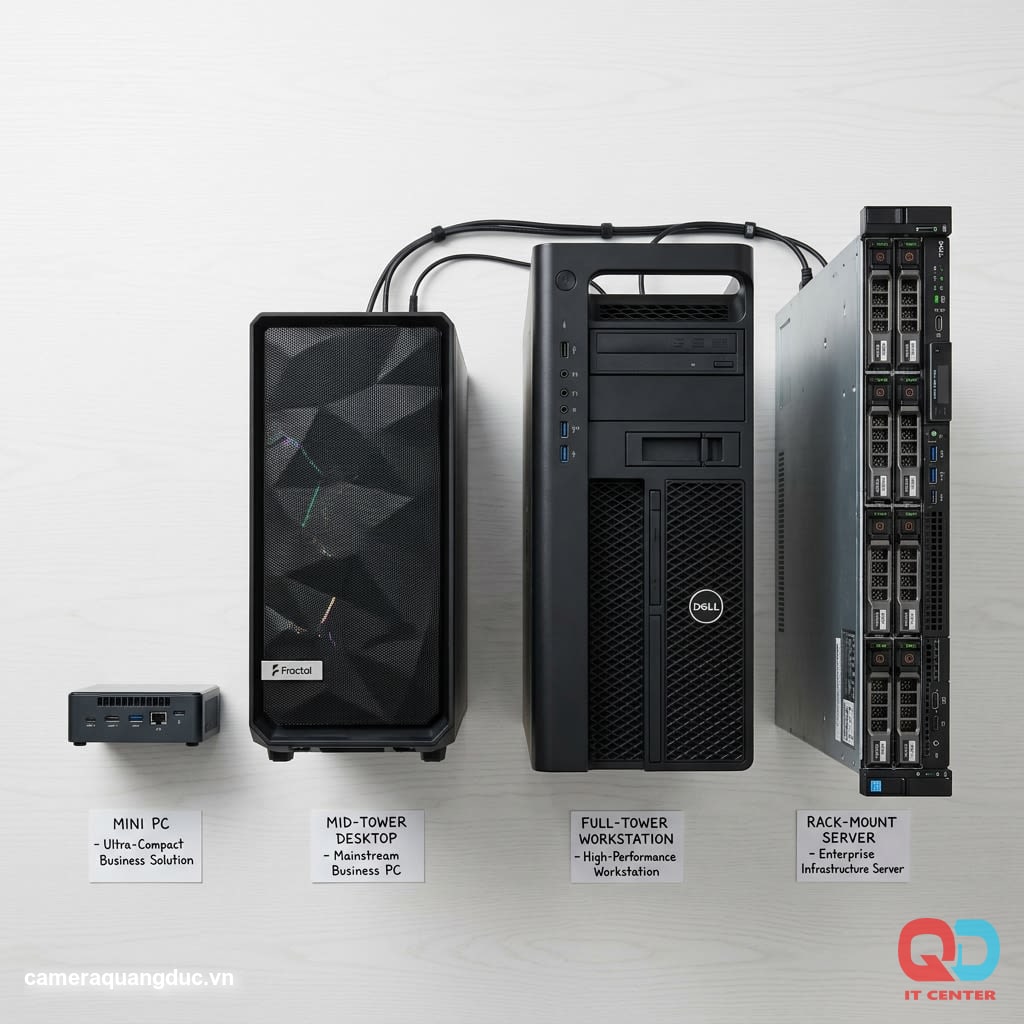
The table below summarizes recommended configurations and reference prices in the Vietnamese market (prices exclude VAT and monitor):
Role
CPU
RAM
Storage
GPU
Reference price
Office staff
Intel Core i5-12400 / i3-13100
8GB DDR4
256GB NVMe
Integration
8–12 million
Sales & Marketing
Intel Core i5-13500 / Ryzen 5 7600
16GB DDR4
512GB NVMe
GTX 1650 or integrated graphics
12–18 million
Graphic design
Intel Core i7-13700 / Ryzen 7 7700X
32–64GB DDR5
1TB NVMe PCIe 4.0
RTX 4060 Ti / RTX 3070
25–40 million
Dev / Data / AI
Intel Core i9-13900K / Ryzen 9 7950X
64–128GB DDR5
2TB NVMe PCIe 4.0
RTX 4080 / RTX 4090
45–90 million
Internal server
Intel Xeon / AMD EPYC
128–512GB ECC
RAID SSD/HDD
No / Dedicated GPU
80–200+ million
3. Business-Class vs. Consumer-Grade Hardware
This is a crucial point that many businesses overlook when making large-scale purchases.
3.1 Substantive Differences
Business-class laptops such as Dell OptiPlex/Vostro, HP EliteDesk/ProDesk, and Lenovo ThinkCentre are designed with:
- Higher durability: MIL-STD-810 certified (heat, vibration, and dust resistant), industrial-grade components.
- Long product cycle: The same model lasts 3-5 years, ensuring repeat purchases of the same configuration.
- Remote administration (vPro/DASH): IT administrators can install, update, and troubleshoot remotely without needing to be physically present at the computer.
- On-site/NBD (Non-Business Warranty): Technicians arrive on-site within the next business day — compared to consumer-grade products which require sending to a service center and take 7-14 days.
3.2 Choosing a PSU and Mainboard
In a business environment, the quality of the power supply unit (PSU) and motherboard directly impacts system lifespan:
- PSU: Choose one that meets at least the 80 PLUS Bronze standard and has 20-30% more power than the maximum load. Avoid no-name, uncertified PSUs.
- Mainboard: Business-class motherboards use B-series or Q-series (Intel) boards, supporting vPro, ECC (some models), and have more expansion slots than consumer H-series motherboards.
- ECC RAM for workstations: ECC (Error-Correcting Code) memory automatically detects and corrects single-bit errors — essential for CAD/BIM environments and critical financial analysis.
3.3 Total Cost of Ownership (TCO)
When calculating the 3-year TCO, business-class machines are typically cheaper than consumer-grade machines, even though the initial purchase price is 15-25% higher:
- Less downtime → employees work continuously
- On-site warranty → no need to take your device in for repair.
- Centralized management → reduced IT support hours
4. Configuration According to Specialized Software
4.1 Accounting Software & ERP
Software like MISA, Fast Accounting, and SAP Business One doesn't require a powerful GPU, but it does need sufficient RAM and a fast hard drive.
- CPU: Intel Core i5 12th generation or higher
- RAM: 16GB (MISA runs concurrently with Excel and web browser)
- SSD: NVMe 256-512GB (lower latency is prioritized over capacity)
- Connection: Gigabit Ethernet, no Wi-Fi used for the accounting workstation.
4.2 Content Design & Production
The Adobe Creative Suite (Photoshop, Illustrator, Premiere, After Effects) leverages multi-core CPUs, large amounts of RAM, and CUDA GPUs:
- Premiere and After Effects: Enable GPU acceleration → requires VRAM ≥ 8GB
- Photoshop: Allocate RAM to a maximum of 70% of the installation space; 32GB is more than enough.
- Exporting 4K video: RTX 4060 Ti shortens rendering time by 40-60% compared to exporting using only the CPU.
4.3 Programming & DevOps
Software development environments (VS Code, Docker, JetBrains IDE) consume more RAM than users typically think:
- Docker Desktop on Windows: Requires a minimum of 16GB, 32GB recommended.
- Compiling large projects: Multi-core CPUs are more important than high clock speeds.
- NVMe PCIe 4.0 SSDs: Significantly reduce build/index code time.
- Displays: A minimum of two Full HD monitors, or one 27-32 inch 4K monitor.
5. Selection & Implementation Process for Businesses

5.1 Inventory of Needs Before Purchasing
Checklist for assessing needs before placing an order:
- List the software that each department uses daily.
- Determine the typical number of applications running concurrently.
- Assess the volume of work data (CAD files, videos, databases).
- Consider your monitor connection needs (number, resolution).
- Identify security requirements (TPM 2.0, BitLocker, Secure Boot)
- Plan for replacement cycles (3-5 years for business-class).
5.2 Group Configuration Standardization
Businesses with 20 or more computers should standardize 2-3 configurations for the entire organization instead of purchasing individual machines. Benefits:
- Reduce IT support costs (only need to know 2-3 models)
- Replacement parts (RAM, SSD of the same standard) are readily available.
- Deploying a unified operating system image via PXE/MDT
- Better prices are negotiated when buying in bulk.
5.3 Warranty & Post-Deployment Support
When signing a contract to purchase business-class equipment, the following should be clearly stated:
- SLA warranty: Next Business Day (NBD) on-site or carry-in?
- Warranty period: 3 years is the minimum for a business environment.
- Extended warranty services (ProSupport, Care Pack, Premier Support)
- Replacement policy: upgrade or repair?
Quang Duc's PC/Workstation Consulting & Supply Services

Quang Duc Electronics and Telecommunications Co., Ltd. provides comprehensive PC and workstation solutions for businesses:
- We provide configuration advice based on job roles and analyze actual needs before giving a quote.
- We supply and install genuine business-class computers (Dell, HP, Lenovo) with VAT invoices.
- Install operating systems, licensed software, domain joins, and policies according to business requirements.
- On-site warranty and post-deployment technical support, business day response.
- Upgrade the RAM, SSD, and GPU of your existing system to extend the lifespan of your devices.
With over 10 years of experience serving businesses in Quang Nam and Da Nang, Quang Duc has implemented hundreds of projects equipping and upgrading computers for agencies and small and medium-sized enterprises in the Central region.
Conclude
No single PC configuration is suitable for every position in a business. Office workers need stability and low cost; design engineers and programmers need high performance to avoid interruptions; and internal servers require absolute reliability with ECC and RAID. Investing wisely in hardware from the start helps businesses avoid early upgrade costs and minimize downtime that impacts business operations.
Choosing business-class machines over consumer-grade ones, standardizing configurations based on user groups, and having clear warranty contracts are three key factors for effective long-term enterprise IT infrastructure management. These are steps that large businesses in Vietnam have adopted and proven effective in practice.
Contact Quang Duc for a free needs assessment and a quote for a customized configuration tailored to each department in your organization.
Hotline: 0903 306 126 (Mr.Vũ Trần) | Website: cameraquangduc.vn